


Avella Smart
Swipe-Ready Creator Kit
Swipe-Ready Creator Kit
Digital planners, trackers and content kits. A little smarter. Every day.
Couldn't load pickup availability
Delivery
Delivery
Instant digital download. There is no delivery charge. After checkout, your download link is in your order confirmation email and on your download page. No shipping and no waiting.
Returns
Returns
This is a digital download, so there is nothing to post back. Your download access is in your order email and on your download page. Because you get instant access, we can't refund a change of mind once the download has started. If a file is faulty or not as described, contact us and we'll put it right or refund you; your statutory rights still apply. See our Refund policy.
What you need / Supported software
What you need / Supported software
Works with the free tools named on each product: Google Sheets or Microsoft Excel for planners and trackers, Canva for editable templates, Notion for Notion systems, and any PDF reader for guides. You only need a free account or the app. See "Apps & connectivity" and "What's included" in this product's description for exact formats and setup steps.
Preview / Example
Preview / Example
Where a free read-only sample is available, open the Preview link in this product's description below. Samples use fictional example data; viewers can't edit — make a copy to use your own numbers.
- Instant download
- Secure checkout
- Download access & refunds
Specifications
Specifications
| Brand | Avella Smart |
|---|---|
| Category | Digital Downloads |
Full product details, app requirements and what to know before ordering are shown further down this page.
Check file formats and what’s included before you buy.


PRODUCT DETAILS
Designed for everyday use.
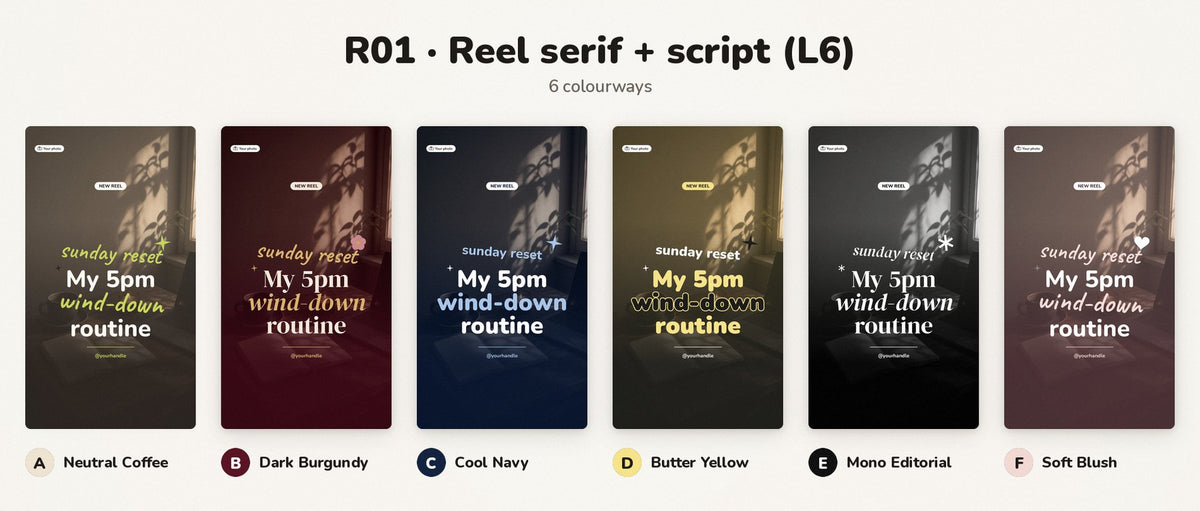
Editable in Canva: 30 designs × 6 colourways (12 posts, 8 carousels, 10 Reel covers) in 18 PowerPoint files you import into a free Canva account + AI prompt pack + how-to guide.
Made for creators, coaches, small businesses and UGC-style creators, plus the social media managers and VAs who post for them. Pick a colourway, upload its PowerPoint (.pptx) file to Canva, swap in your own words and photos, and post. A free Canva account is enough — no Canva Pro and no trial needed. Text stays editable, shapes can be recoloured and photos can be replaced.
What's included
- 18 editable PowerPoint (.pptx) files: three per colourway — Posts 4:5, Posts 1:1 and Reel covers 9:16 — holding all 30 designs in all 6 colourways
- 12 posts: 8 × 4:5 portrait (1080×1350) and 4 × 1:1 square (1080×1080)
- 8 carousels: 32 slides at 4:5 (1080×1350), including seamless swipe designs
- 10 Reel covers: 9:16 static covers (1080×1920)
- 6 colourways for every design: Neutral Coffee Scrapbook, Dark Feminine Burgundy, Corporate Cool Navy, Butter Yellow Type, Monochrome Editorial and Soft Blush Coach
- AI Prompt Pack (PDF): prompts that write hooks, captions and slide copy to fit each layout
- START-HERE guide and HOW-TO-CANVA step-by-step editing guide
- Assistant-Setup for your AI chat assistant
- Licence and file manifest
A colourway is a palette swap of the same layout. Preview images on this listing (and sample words in the files, such as stats or testimonials) use placeholder / sample copy — not real results.
How it opens in Canva
- Unzip the download on your computer.
- Sign in to Canva (a free account is fine) and go to the home page.
- Upload a .pptx file, or drag it onto the Canva home page. Upload the .pptx file itself — don't convert it to PDF first.
- Canva opens it as an editable design at the right size. Repeat for the other files you want (three files cover one colourway; all 18 cover every colourway).
The designs use free fonts already in Canva (Nunito, Caveat and DM Serif Display). You work in your own Canva copy; the .pptx in your download stays as it is, so you can import it again for a fresh start. There's no shared template link to open — you import the files yourself.
How the AI part works
The AI is optional. Paste the prompts into your own ChatGPT, Claude, Gemini or Copilot (free tiers work). There is no hosted Avella AI and no Custom GPT to sign up for.
What you need
- A computer to unzip the download and upload the .pptx files
- A free Canva account (Canva Pro is not needed)
- Optional: any AI chat assistant for the prompt pack
Instant digital download, available worldwide. Nothing physical is shipped.
Licence
Personal and commercial use, including content you make for client accounts. You may not resell, share or redistribute the PowerPoint files, prompt pack or other files in the download.
Please note
Canva is a third-party service with its own terms; menu names can change over time. AI prompts need third-party AI tools, which may have their own costs, limits and terms. AI outputs vary and are not guaranteed. Always review outputs before you use them. This kit is a design and writing aid and doesn't guarantee reach, followers, sales or any other result. Canva, PowerPoint and Instagram are trademarks of their owners; Avella Smart isn't affiliated with or endorsed by them.
Digital download
This is a digital product, delivered instantly after payment. Nothing is posted. At checkout you confirm that you want immediate access to your digital download and that you understand you lose your 14-day right to cancel once the download starts. If a file is faulty or isn't as described, email hello@avellasmart.com and we'll put it right. Your legal rights are not affected. See our Refund policy.
Support
Questions? Email hello@avellasmart.com.