


Avella Smart
Sole Trader Books
Sole Trader Books
Digital planners, trackers and content kits. A little smarter. Every day.
Couldn't load pickup availability
Delivery
Delivery
Instant digital download. There is no delivery charge. After checkout, your download link is in your order confirmation email and on your download page. No shipping and no waiting.
Returns
Returns
This is a digital download, so there is nothing to post back. Your download access is in your order email and on your download page. Because you get instant access, we can't refund a change of mind once the download has started. If a file is faulty or not as described, contact us and we'll put it right or refund you; your statutory rights still apply. See our Refund policy.
What you need / Supported software
What you need / Supported software
Works with the free tools named on each product: Google Sheets or Microsoft Excel for planners and trackers, Canva for editable templates, Notion for Notion systems, and any PDF reader for guides. You only need a free account or the app. See "Apps & connectivity" and "What's included" in this product's description for exact formats and setup steps.
Preview / Example
Preview / Example
Where a free read-only sample is available, open the Preview link in this product's description below. Samples use fictional example data; viewers can't edit — make a copy to use your own numbers.
- Instant download
- Secure checkout
- Download access & refunds
Specifications
Specifications
| Brand | Avella Smart |
|---|---|
| Category | Planners & Trackers |
Full product details, app requirements and what to know before ordering are shown further down this page.
Check file formats and what’s included before you buy.


PRODUCT DETAILS
Designed for everyday use.
A bookkeeping spreadsheet for sole traders, freelancers and online sellers, for Excel and Google Sheets — log income, expenses, mileage and working-from-home, and see your year sorted into four quarters with MTD-style quarterly summaries. Optionally paste a privacy-safe summary into the AI assistant you already use.
Built for sole traders, side hustlers and makers selling on Etsy, Shopify, Vinted, eBay, their own website or at craft fairs. Built-in references follow UK rules (April–March tax year, SA103 expense boxes); pick £, $, € or no symbol on the Start Here tab. It changes the symbol only and never converts amounts.
Preview — see how it works
See how it works before you buy — open the read-only example (Fernhill Paper Co. sample data). Viewers can’t edit; make a copy or use the Blank after purchase.
What's included
- Blank workbook ready for your own figures
- Filled example workbook (fictional business and figures) so you can see how it works
- README (PDF) with setup steps for Excel, Excel for the web, Google Sheets and LibreOffice
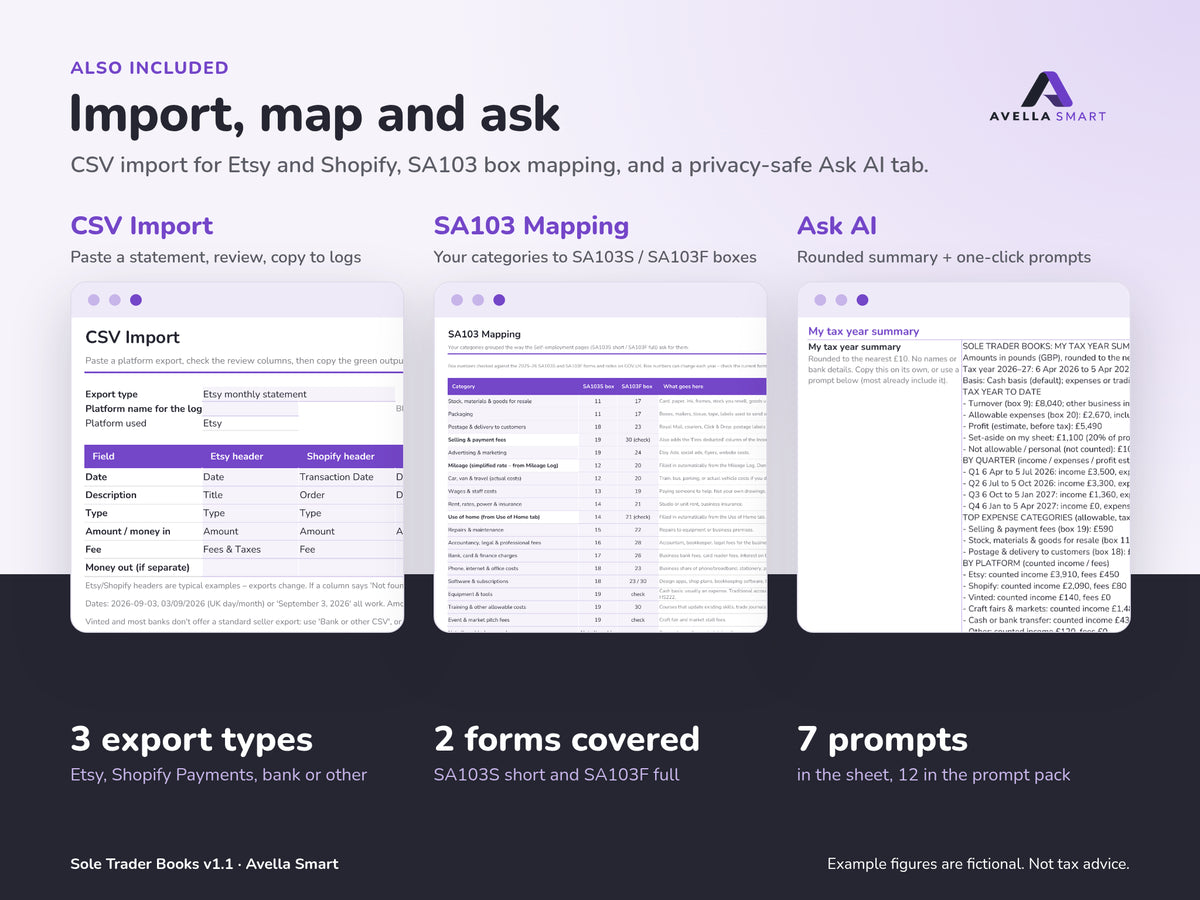
- Ask AI tab: builds a paste-ready summary of your year rounded to the nearest 10, with no customer names or bank details
- AI Prompt Pack (PDF) with 12 ready-made prompts, including Fix-my-sheet
- Privacy and AI Safety Card (PDF)
- Assistant Setup text, an optional Claude Skill, and an optional Power Users guide for Gemini in Sheets / Copilot in Excel (may need a paid plan)
- Licence file
- Preview images of the main tabs
Twelve tabs: Start Here, Setup, Dashboard, Ask AI, Income Log, Expense Log, CSV Import, Mileage Log, Use of Home, Quarterly Summary, SA103 Mapping, and Tax Year Close.
Ask AI (optional)
The Ask AI tab uses ordinary spreadsheet formulas only — nothing is sent anywhere from the file. Copy a prompt and paste it into your own ChatGPT, Claude, Gemini, Copilot or similar. There is no hosted Avella AI and no Custom GPT included. Read the Privacy card before you paste anything. AI replies can be wrong; the assistant is an organising helper, not a tax adviser or accountant, and its replies are not tax advice. The sheet is always the source of truth.
What you can do
- Income Log (1,000 rows) for sales, payouts, refunds and platform fees
- Expense Log (1,000 rows) with categories, business % for mixed-use costs and a receipt tick
- CSV Import to speed up logging from a platform statement or bank CSV
- Mileage Log at an editable rate per mile, and Use of Home by flat rate or share of bills
- MTD-style quarterly summaries and year-to-date totals by expense box
- Expenses grouped under SA103S / SA103F self-employment boxes, plus a trading allowance comparison (an organising check only, not a recommendation)
- Dashboard with turnover, expenses, a profit estimate and data checks; end-of-year checklist and key UK dates
- No macros, no scripts and no external connections
What you need
Excel 2016 or later, free Excel for the web, a free Google account for Google Sheets, or free LibreOffice Calc. An AI assistant is optional and is your own account if you use one. Not designed for limited companies, partnerships or VAT returns.
Important
This spreadsheet is an organisation and record-keeping tool. It is not tax, accountancy, legal or financial advice. It is not HMRC software, it does not file anything with HMRC and it does not work out your tax bill. If Making Tax Digital for Income Tax applies to you, you will need compatible software to send quarterly updates; this workbook keeps MTD-style quarterly summaries so your figures are organised and ready to check. Check current rules on GOV.UK (www.gov.uk/self-assessment-tax-returns), get free guidance from MoneyHelper (www.moneyhelper.org.uk), and speak to an accountant or tax adviser about your own situation. Example figures are fictional.
Digital download
This is a digital product, delivered instantly after payment. Nothing is posted. At checkout you confirm that you want immediate access to your digital download and that you understand you lose your 14-day right to cancel once the download starts. If a file is faulty or isn't as described, email hello@avellasmart.com and we'll put it right. Your legal rights are not affected. See our Refund policy.
Support: hello@avellasmart.com