


Avella Smart
Christmas Budget & Gift Planner
Christmas Budget & Gift Planner
Digital planners, trackers and content kits. A little smarter. Every day.
Couldn't load pickup availability
Delivery
Delivery
Instant digital download. There is no delivery charge. After checkout, your download link is in your order confirmation email and on your download page. No shipping and no waiting.
Returns
Returns
This is a digital download, so there is nothing to post back. Your download access is in your order email and on your download page. Because you get instant access, we can't refund a change of mind once the download has started. If a file is faulty or not as described, contact us and we'll put it right or refund you; your statutory rights still apply. See our Refund policy.
What you need / Supported software
What you need / Supported software
Works with the free tools named on each product: Google Sheets or Microsoft Excel for planners and trackers, Canva for editable templates, Notion for Notion systems, and any PDF reader for guides. You only need a free account or the app. See "Apps & connectivity" and "What's included" in this product's description for exact formats and setup steps.
Preview / Example
Preview / Example
Where a free read-only sample is available, open the Preview link in this product's description below. Samples use fictional example data; viewers can't edit — make a copy to use your own numbers.
- Instant download
- Secure checkout
- Download access & refunds
Specifications
Specifications
| Brand | Avella Smart |
|---|---|
| Category | Planners & Trackers |
Full product details, app requirements and what to know before ordering are shown further down this page.
Check file formats and what’s included before you buy.


PRODUCT DETAILS
Designed for everyday use.
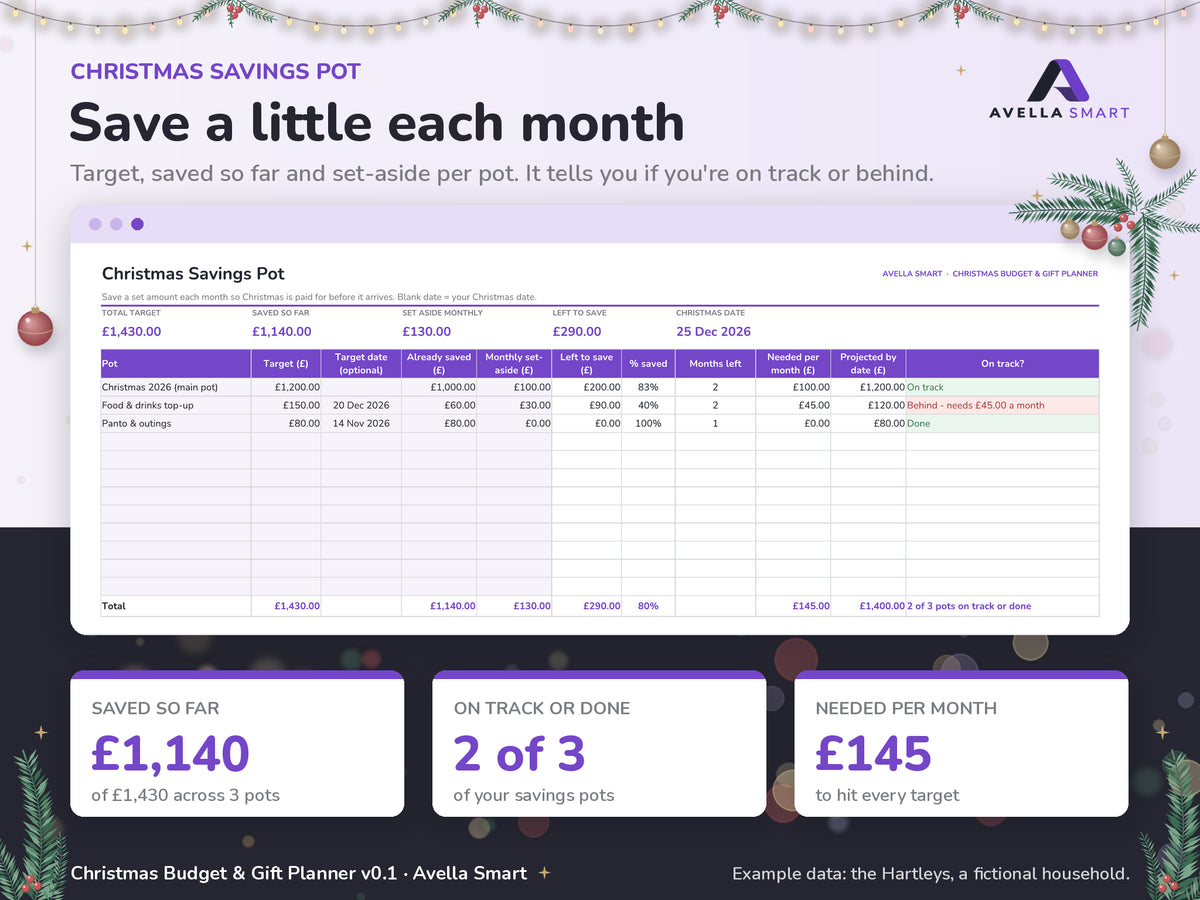
A Christmas budget and gift planner for Excel and Google Sheets — set one festive budget, plan every present by person, and keep stocking fillers, food and hosting, cards and postage, and decorations in one calm, clear workbook. A Christmas Savings Pot helps you put a little aside each month, and a January Catch-Up tab shows what Christmas really cost so next year is easier.
Uses £ by default, but any currency works. Pick £, $, € or no symbol on the Start Here tab; it changes the symbol only and never converts amounts.
Preview — see how it works
See how it works before you buy — open the read-only example (Hartleys household, Christmas 2026 sample data). Viewers can’t edit; make a copy or use the Blank after purchase.
What's included
- Blank workbook ready for your own Christmas
- Filled example workbook (a fictional family and figures) so you can see how it works
- README (PDF) with setup steps for Excel, Excel for the web, Google Sheets and LibreOffice, including make-a-copy links for Google Sheets
- Licence file
- Preview images of the main tabs
Ten tabs: Start Here, Dashboard, Gift List, Stocking, Food & Hosting, Cards & Postage, Decorations & Other, Christmas Savings Pot, December Countdown, and January Catch-Up.
What you can do
- See your total Christmas budget, what you've spent and what's left on the Dashboard, with a countdown of days to Christmas
- Plan gifts per person with a budget and actual cost, and track each one from idea to bought, wrapped and delivered
- Keep stocking fillers separate so the small things don't creep up on you
- Plan your Christmas food, hosting and shopping costs
- Track cards, stamps and postage, plus decorations and everything else
- Build a Christmas Savings Pot month by month
- Work through a December Countdown to-do list
- Use January Catch-Up to record what Christmas actually cost and plan next year's pot
- Reuse it year after year
- No macros, no scripts and no external connections
What you need
Excel 2016 or later or Microsoft 365, free Excel for the web, a free Google account for Google Sheets, or free LibreOffice Calc.
Important
This spreadsheet is an organisation and planning tool. It is not financial, tax or budgeting advice. Figures and dates are estimates you enter yourself. Example names and figures are fictional and illustrative. For free, impartial money guidance, visit MoneyHelper (www.moneyhelper.org.uk).
Digital download
This is a digital product, delivered instantly after payment. Nothing is posted. At checkout you confirm that you want immediate access to your digital download and that you understand you lose your 14-day right to cancel once the download starts. If a file is faulty or isn't as described, email hello@avellasmart.com and we'll put it right. Your legal rights are not affected. See our Refund policy.
Support: hello@avellasmart.com